Why Your UTM Spreadsheet Keeps Breaking (And What to Use Instead)
Every UTM spreadsheet is born innocent. Somebody spins up a tab with a few tidy columns, drops in a CONCATENATE formula to stitch the parameters together, and for a golden week or two it hums along like a machine that will never break. Then the campaigns start breeding. A year later the thing has two thousand rows, takes eight seconds to open, the formula quietly died somewhere around row 400, and no two people on earth have the same copy. You know this file. You may be running from it right now.
Spreadsheets are a genuine wonder. They were also never built to enforce consistency or to carry a shared process on their back. Here is exactly where they crack up under UTM duty, and how to keep the part you love without the wreckage.
The predictable ways the sheet eats itself
The formulas break on the characters that matter most
A CONCATENATE or & formula does not encode a thing. The first time a campaign name carries a space, an ampersand, or some proud accented character, the link it spits out is quietly broken. Nobody notices until the clicks fail to show up in analytics, which is the single worst moment in the calendar to find out.
There is no validation, so typos harden into data
A spreadsheet will cheerfully swallow Facebook, facebook, and facebok in the same column without blinking. Nothing stands guard, so every typo becomes a permanent, separate row in your reports. Run that across a team and your channel data turns to gray soup.
It slows to a dead crawl
Live formulas grinding across thousands of rows is what makes the file freeze and the fan spin up like a small aircraft. The sheet that felt instant at 50 links is a punishment at 2,000, and it gets heavier every month you refuse to leave.
Everybody has their own copy
Someone clones the sheet for a launch. Someone else downloads it and edits it on a plane. Now there are three versions and zero sources of truth. The one artifact that was supposed to hold the line is doing the exact opposite, in the dark, on three laptops.
You will never find anything again
Six months on you need the link from last spring's newsletter. Good luck, friend. A flat sheet of two thousand rows has no real search, no projects, no grouping. The history is technically in there and functionally lost, like a body at the bottom of a lake.
When the spreadsheet is honestly fine
Let us be fair before we bury it. If you build a handful of links a month, alone, a spreadsheet is a perfectly reasonable animal. Every problem above is a problem of scale and of other people. One person at low volume rarely trips a single wire. The trouble starts the day the volume climbs or a second set of hands starts adding rows.
What to use instead
You do not have to surrender the thing you actually like, which is the fast, grid-style, build-a-pile-at-once workflow. You just want the grid to do the work the spreadsheet flat refuses to:
- Encoding handled for you, so a space or a symbol never quietly guts a link again.
- Dropdowns instead of open text, so a typo can never graduate into a brand new channel.
- Speed that refuses to rot as you pile on links, because nothing is recalculating a thousand doomed formulas.
- Saved projects and real search, so last spring's newsletter link is one click away instead of one seance.
- One shared version, so the whole team is finally staring at the same reality.
- Copy-all and CSV export, so your data walks out the front door whenever you want it, no ransom.
Keep the workflow, dump the wreckage
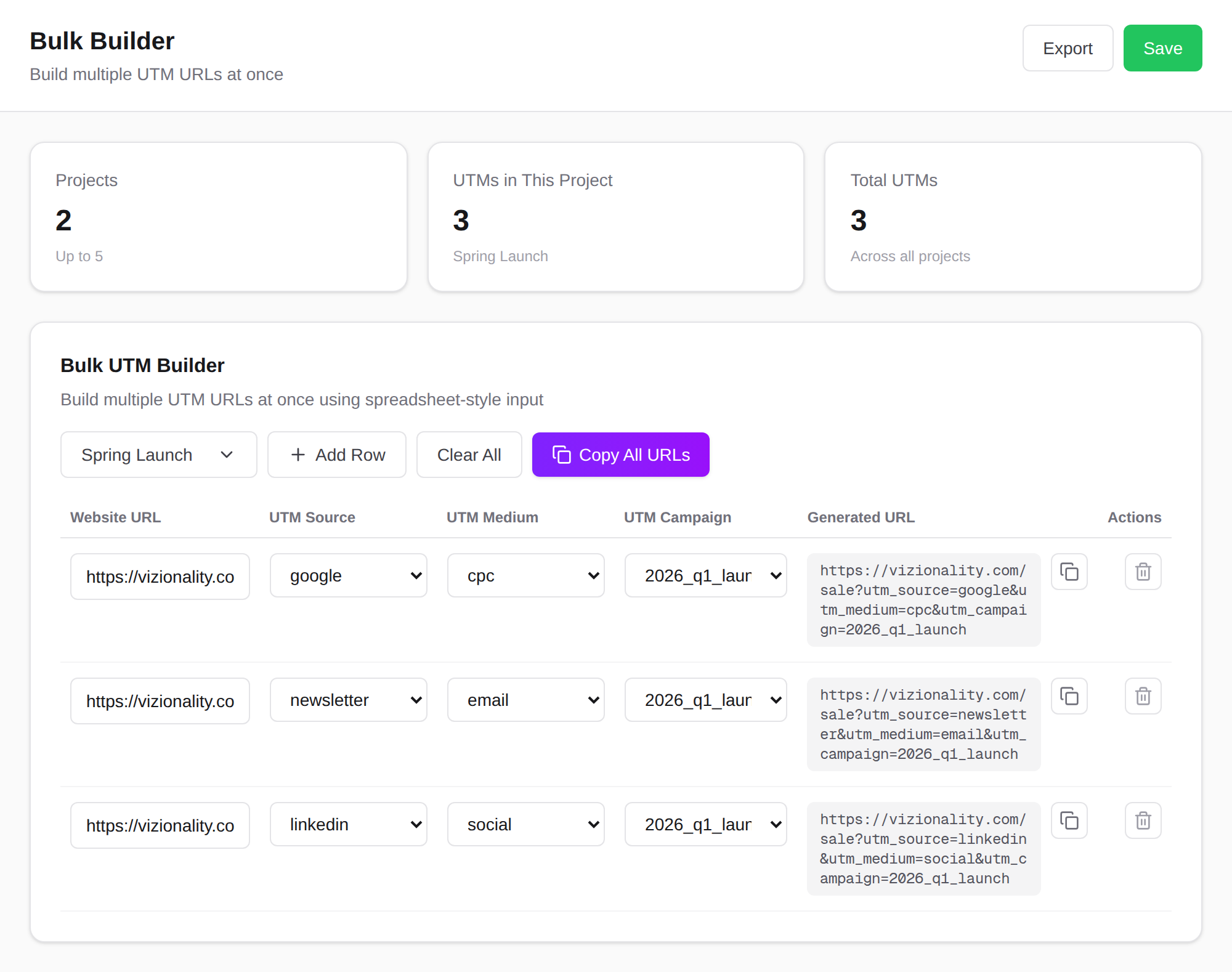
The Bulk Builder in UTMBuilder is a spreadsheet-style grid on purpose, because that workflow is genuinely good and we are not too proud to admit it. The difference is that every row pulls from dropdowns of your saved sources and mediums, the encoding happens without you, every link is saved into a project you can actually search, and you can copy every URL at once or export the whole project to CSV. It is the spreadsheet you wanted before it turned on you, minus the frozen file and the broken formulas. Free to start, no credit card, no strings.
Build clean UTM links in seconds
Set your sources, mediums, and campaign names once, then generate consistent, correctly encoded links, one at a time or in bulk.
Start building freeFrequently asked questions
- Why does my UTM spreadsheet keep breaking?
- Formulas like CONCATENATE do not encode values, so spaces and special characters break the links. There is no validation, so typos become permanent rows in your reports, and the file slows down as it grows. Spreadsheets were not built to enforce consistency.
- Is a spreadsheet good enough for UTM tracking?
- For a handful of links built by one person, yes. Once several people add rows or you are tagging at volume, the lack of encoding, validation, and a single shared version starts to cost you clean data.
- How do I build UTMs in bulk without a spreadsheet?
- Use a builder with a grid and dropdowns that encodes values for you, saves every link into searchable projects, and exports to CSV. You keep the fast spreadsheet-style workflow without the broken formulas or frozen file.
- Can I keep my existing UTM history?
- Yes. You can keep your old spreadsheet as a record and start building new links in a tool that saves them going forward, then export to CSV whenever you need the data elsewhere. The goal is to stop the manual copy-paste, not to lose past records.